Adding or removing a family member in the TS Ration Card (FSC) is a common requirement due to marriage, birth, death, or migration. The Civil Supplies Department of Telangana allows citizens to update ration card details through MeeSeva centers and the EPDS system. This article explains the complete process of adding a ration card member to the Telangana ration card.
When Can You Add or Remove a Member?
You can ADD a member in case of:
- Marriage
- Birth of a child
- Family member shifting from another ration card
You can remove a member in case of:
- Death of a family member
- Divorce or separation
- Migration to another state
- Duplicate ration card issue
Documents Required to Add a Member to a TS Ration Card
- Aadhaar card of the new member
- Aadhaar card of the head of the family
- Marriage certificate / Birth certificate (if applicable)
- Existing ration card details
- Mobile number linked with Aadhaar
Documents Required to Remove Member
- Aadhaar card of the member to be removed
- Death certificate (if applicable)
- Written declaration or application form
- Existing ration card details
How to Add a Member in Telangana Ration Card
Currently, adding a member is done offline through MeeSeva, followed by a backend EPDS update.
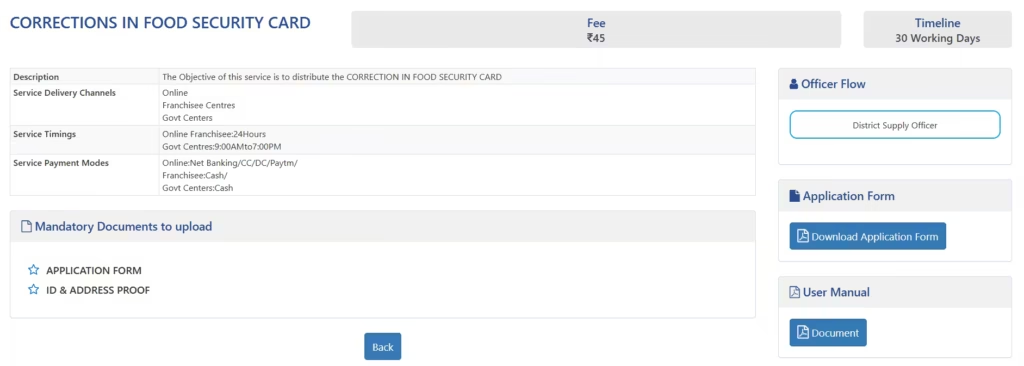
- Visit the nearest MeeSeva Center
- Ask for the “Ration Card Member Addition” service
- Submit required documents
- Fill the application form carefully
- Verify details with the MeeSeva operator
- Pay the prescribed service charge
- Collect the acknowledgement/reference number
After verification by Civil Supplies officials, the member will be added to your FSC card.
How to Remove a Member from the TS Ration Card
- Visit MeeSeva Center
- Select the “Ration Card Member Deletion” service
- Submit supporting documents
- Provide a reason for deletion
- Pay the service fee
- Get an acknowledgement slip
Once approved, the member’s name will be removed from the ration card database.
Processing Time
- Normal processing time: 15 to 30 days
- In some cases, physical verification may be conducted
How to Check the FSC card family member Update?
You can check the status using:
- FSC Reference Number
- Aadhaar Number
Status can be checked on the official EPDS Telangana portal.
Important Points to Remember
- Aadhaar linking is mandatory for all members
- Only one active ration card per family is allowed
- Providing false information may lead to card suspension
- Updates are reflected only after official approval
Frequently Asked Questions
Can I add a member online without MeeSeva?
No. Currently, MeeSeva is mandatory for adding or deleting members.
Is there any fee for a member update?
Yes, MeeSeva service charges apply as per government norms.
Can I remove a member temporarily?
No. Removal is treated as permanent unless added again through the proper process.
medashravankumar7@gmail.com
Pingback: List of Documents Required for TS Ration Card Application